
Zoho CRM vs Salesforce CRM: Features, Pricing & Comparison for Small, Growing & Enterprise Businesses (2026)
Choosing the right CRM software is important for your sales strategy. A CRM does more than help with tasks—it supports your whole sales process. With so many options out there, finding the best fit can be tough. Zoho and Salesforce are two well-known CRM platforms that both offer strong lead management features. Zoho CRM is highly praised for its great value, affordable automation, and easy-to-use features. Meanwhile, Salesforce stands out for its exceptional customer support, advanced analytics tools, and mobile applications.
Salesforce leads the market in customer relationship management (CRM) platforms, but it may not be the best choice for every business. Zoho CRM is a strong alternative. Both Salesforce and Zoho CRM serve different businesses based on their needs and sizes, making the decision which one to choose a challenge.
Managing customer relationships can be challenging. The right CRM should help your teams handle customer interactions and internal workflows more efficiently and effectively.
When comparing Zoho and Salesforce, neither is objectively better than the other. Instead, one might be a better fit for your specific needs.
Salesforce is known for being a high-quality product that can grow easily with your needs. In contrast, Zoho offers one of the best prices in the industry for each user.
We tested both CRMs thoroughly to see how they differ. Based on my experience, here is a comparison of the two.
For small businesses, Zoho CRM is often the top choice because it is affordable and easy to set up. However, with the launch of Salesforce Free Suite and Starter Suite ($25 per user per month), Salesforce is now also one of the best CRMs for small businesses in 2026.
Zoho and Salesforce are both good options for small businesses to better manage customer relationships. But which one is the better fit for your business?
This blog compares Zoho and Salesforce. It covers their features, pricing, and when to choose each CRM, along with why.
So, let’s get started.
Zoho vs. Salesforce: Quick Comparison
Zoho and Salesforce offer many products, but I focused on Zoho's main CRM product and Salesforce's Sales Cloud for this comparison. Here are the key differences:
-
Zoho provides an easy-to-use solution for managing customer relationships at a good price. In contrast, Salesforce is a more expensive choice that includes more advanced features.
-
Zoho is better for managing tasks and issues. Salesforce is not as easy to use for these specific needs.
-
Both platforms offer other products that users can add to their basic sales-grade CRM to enhance their usefulness. However, Salesforce offers a much broader range of integrations.
-
Both options now include AI helpers, but Salesforce's can generate more content.
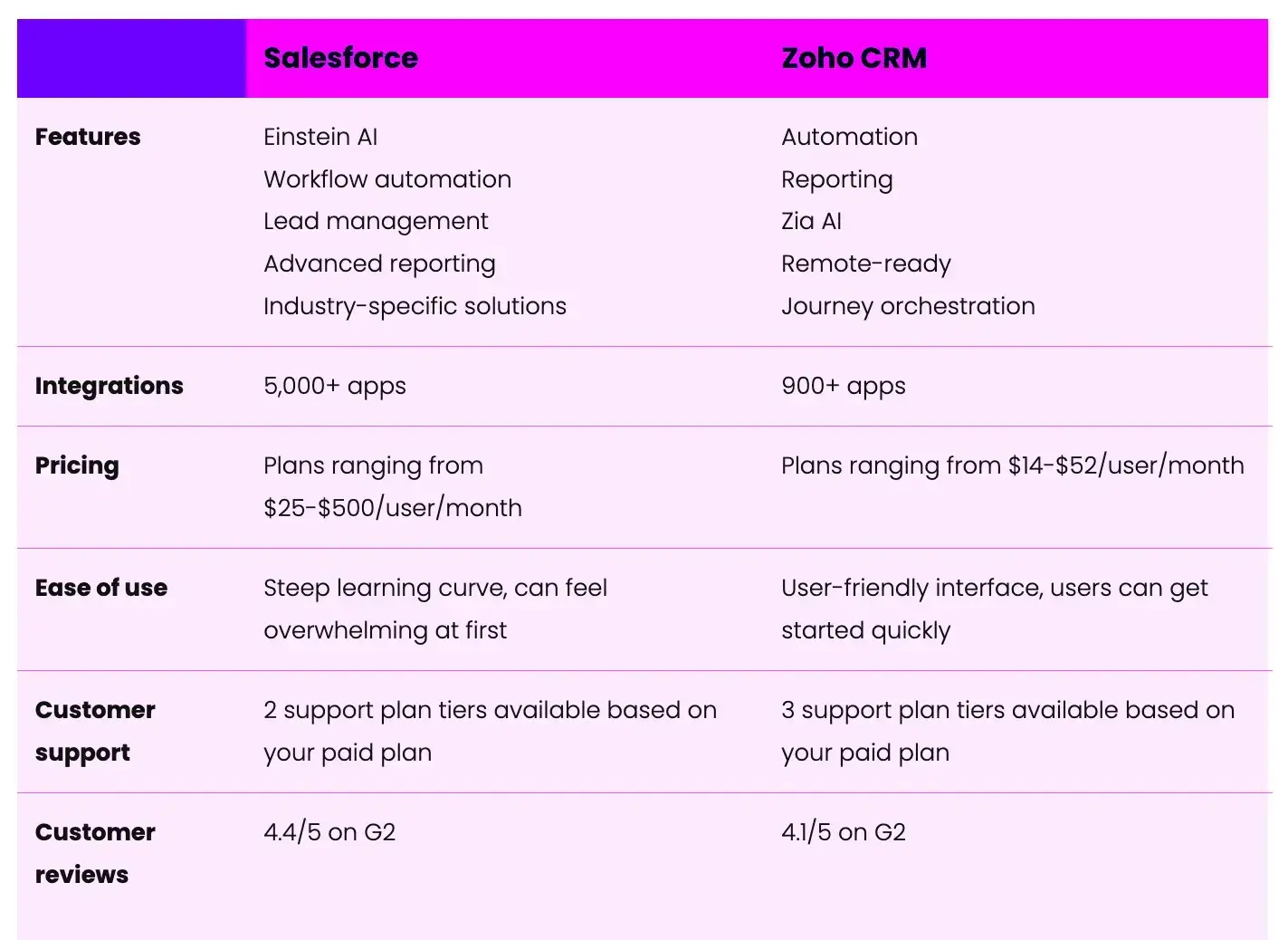
Salesforce Sales Cloud vs Zoho CRM: Detailed Feature Comparison
When choosing between Salesforce Sales Cloud and Zoho CRM, most businesses consider pricing, scalability, automation, AI features, and overall functionality. Here’s a straightforward comparison to highlight the key differences.
Pricing & Value
Salesforce Sales Cloud Pricing
Salesforce offers multiple pricing tiers designed for growing businesses and enterprises:
-
Starter Suite – $25 per user/month
-
Professional – $80 per user/month
-
Enterprise – $165 per user/month
-
Unlimited – $330 per user/month
-
Einstein 1 Sales – $500 per user/month
Salesforce is a leading CRM platform, and its prices match the advanced features and strong capabilities it offers businesses.
Zoho CRM Pricing
Zoho CRM is known for its affordability and value-driven pricing:
-
Standard – $14 per user/month
-
Professional – $23 per user/month
-
Enterprise – $40 per user/month
-
Ultimate – $52 per user/month
Zoho is more affordable, making it appealing to startups and small to mid-sized businesses.
Overall Functionality
-
Salesforce: Salesforce offers robust software for sales management, report generation, and customization for large businesses. Some users find the interface complicated or bulky compared to simpler CRMs, but its features and capabilities are among the best in the industry.
-
Zoho: Zoho CRM has good features for many business needs. However, its user experience can be inconsistent. It offers good value for money, but it may not feel as premium or comprehensive as Salesforce.
Task & Issue Tracking
-
Salesforce: Salesforce helps with managing tasks, but it is not built for tracking daily tasks. It does not have a special issue-tracking module like Zoho. Instead, it focuses more on sales pipelines than on project management.
-
Zoho: Zoho CRM has strong tools for tracking tasks and issues. Its Projects dashboard is easy to use and visually appealing. It also has a special module for tracking issues, which helps service teams.
Scalability
-
Salesforce: Salesforce is known for its ability to grow with your business. It offers many third-party apps, different cloud products, and advanced options for large companies. It makes it suitable for businesses of all sizes. It is especially good for companies focused on long-term growth and digital change.
-
Zoho: Zoho is a good choice for growing businesses and some larger companies. However, very large organizations may find that Zoho offers fewer features than Salesforce's broader range.
Automation Capabilities
-
Salesforce: Salesforce has strong automation tools, especially in its higher-tier plans. These plans offer advanced workflows, approvals, and process automation, which are significant benefits. However, the lower-tier plans may have fewer automation features.
-
Zoho: Zoho provides decent automation for common tasks and workflows. While effective for small and mid-sized teams, its sequence designer can sometimes feel slightly complex to configure.
AI Features
-
Salesforce: Salesforce Einstein AI is fully integrated into the platform. It offers helpful features like generative AI, predictive insights, and smart recommendations for sales teams.
-
Zoho: Zoho’s AI assistant is well-established and more affordable than Salesforce. It helps with everyday CRM tasks and offers predictive insights. However, it may not be as advanced as Salesforce Einstein for large businesses.
The key difference between Zoho and Salesforce
Zoho and Salesforce both offer a wide range of software products for various business activities, with CRM at the core of their integrated systems.
Both companies want to be the main software you use for your business. They target different types of businesses, which is where they differ.
Zoho - Best for small and mid-sized customers
Since 2001, when it was called AdventNet, Zoho has aimed to make things easy for small businesses. One of its first products, Zoho CRM, launched in 2005 and has gone through many updates.
It has been designed to be easy to set up. For example:
-
It comes with 40 preset report templates
-
Much customization is carried out through wizard-style workflows
-
It doesn’t require dedicated technical resources to administer
Simplicity does not mean losing functionality. Zoho CRM offers some clever features that we will explore.
-
Takeaway: Zoho CRM is a great choice for small and mid-sized businesses. It is easy to start using right away and simple to learn for both users and administrators. It is reasonably priced and offers many options for expansion and integration.
Salesforce - Best for enterprise customers
Salesforce is made for large companies. Its tools for smaller businesses still have a lot of complexity, customization, and features, and are priced similarly to solutions designed for big enterprises.
The CRM is very powerful but requires significant expertise to use effectively.
If a customized CRM solution can make your business more efficient and its benefits outweigh the cost of hiring a consultant or the time you’d spend learning to set it up yourself, then Salesforce may be a good choice.
-
Takeaway: Salesforce Sales Cloud is likely the most powerful customer relationship management (CRM) platform available. It offers many features and integrates with other Salesforce applications. However, this flexibility comes at a high cost, both in terms of price and ease of use.
Deciding Between Zoho and Salesforce
We will compare Zoho and Salesforce in five areas.
Key factors for evaluation
1. Ease of use
If a CRM is difficult to use or confusing, people will not use it. Therefore, ease of use and adoption are very important factors to consider.
Questions to ask:
-
How hard is it to set up and use the CRM?
-
Do you need someone dedicated to managing the tool?
-
Can you try the platform and learn how to use it on your own?
-
Will users need special training to use the tool well?
2. Product capabilities
If the user experience is good, the next step is to evaluate what the CRM can do. What features does it have? And what features are missing?
Questions to ask:
-
How complete are the features of the CRM?
-
What integrations does it support?
-
Are the integrations supported directly, or do we need to use third-party API connectors?
-
Are its functionalities out-of-the-box or customizable?
3. Pricing
You can find both free and expensive CRM software. The best choice for your business depends on your team size, budget, and revenue goals that you want the CRM to help you reach.
Questions to ask:
-
Does the CRM have a free trial or a freemium option?
-
Is the pricing reasonable, flexible, and fair for your business needs?
-
Can you choose monthly billing, or do you have to sign a yearly contract?
-
Does the platform charge extra for collaboration?
-
Does it offer different pricing based on user types?
-
Are there any hidden fees?
4. Scalability
Don’t choose a CRM system just for your current needs. Think about where your business will be in the future, too.
Questions to ask:
-
How easy and affordable is it to add more users to the platform?
-
Does it include features for large businesses?
-
Is it specialized CRM software, or does it provide a wider range of tools?
5. Integrations and App Ecosystems
When choosing a CRM, it’s crucial to understand the technology it connects with. Both Zoho and Salesforce are strong in this area.
Questions to ask:
-
How good are its integration options?
-
Does it provide one-way or two-way connections with the tools you want to link to your CRM?
-
Which integrations are built-in, and which ones require a connector, like Zapier?
Comparing Zoho and Salesforce
1. Ease of use
Zoho CRM – Highly User-Friendly and Quick to Deploy
Zoho CRM is easy to use and helps businesses manage leads quickly. Even new users can navigate it without any problems. With tools to import data and synchronize contacts, businesses can set up Zoho CRM and start managing their leads in just a few minutes.
One of Zoho’s biggest advantages is that it works well right from the start. It includes ready-made reports, dashboards, and sales pipelines, so businesses can begin using it without any complicated setup. If customization is needed, it is usually easy to make changes, and these updates apply to existing data.
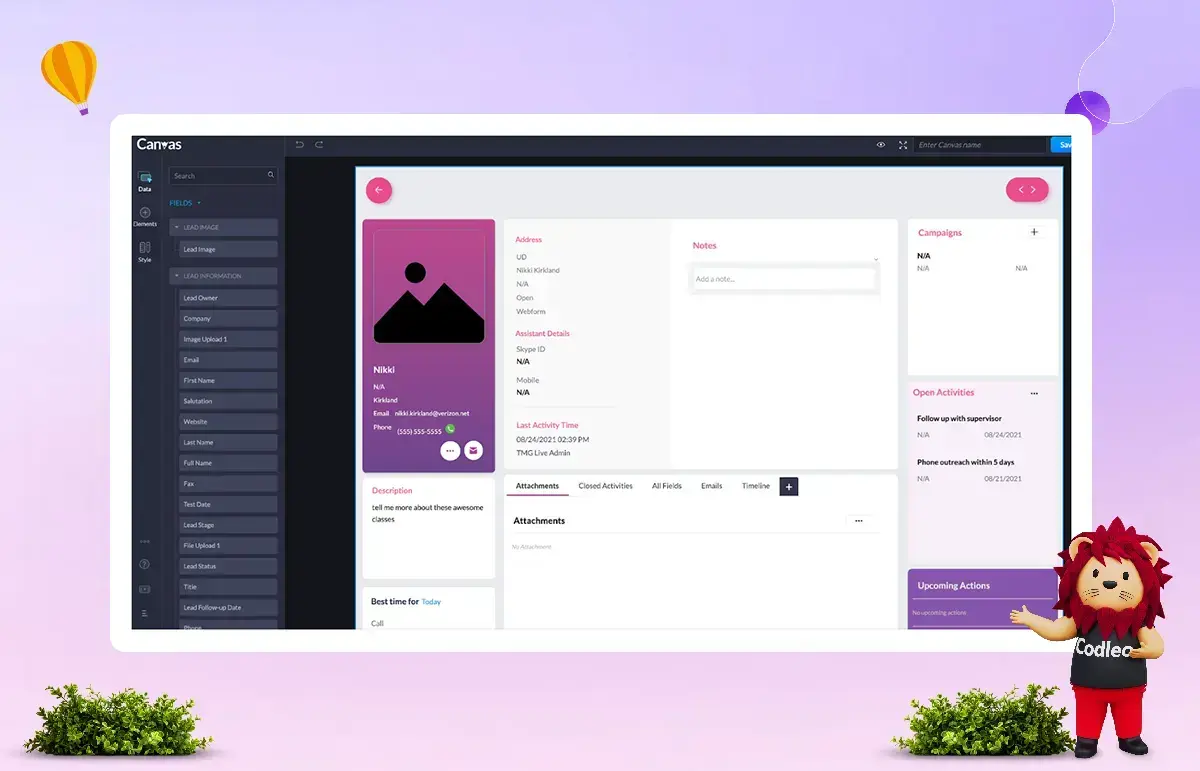
Canvas: No-Code Visual Customization
A key feature of Zoho CRM is Canvas. It is a no-code tool that lets users design and customize their CRM layout by dragging and dropping elements, much like a website builder.
This level of visual customization is a significant advantage for businesses seeking flexibility without technical challenges. In contrast, making similar layout changes in Salesforce can be more complicated and often requires administrative or technical skills.
Customer Support & Assistance
Zoho CRM also provides a strong support structure:
-
All users, including those on the free plan, can get email support. You will receive a response within 24 hours.
-
Paid users can get chat and phone support during business hours.
-
Enterprise-level customers receive 24/7 support and receive quick responses.
-
You can find a lot of helpful information and a community of active users for self-service support.
-
Zoho CRM is easy to use, making it a great choice for small- to mid-sized businesses that need a simple, flexible CRM solution.
Salesforce – Powerful but Complex to Set Up
Setup & Configuration
Salesforce has strong features, but setting it up can take a lot of time and be complicated. Unlike simpler CRM systems that are ready to use right away, Salesforce often requires extensive customization to fit a company's specific needs.
For many organizations, especially small and mid-sized businesses, this means they need to invest more in implementation support. Businesses may need:
-
A Salesforce consultant to design and execute the initial setup
-
A trained Salesforce administrator to manage and maintain the system
-
Ongoing customization as processes evolve
Managing and setting up Salesforce can be tough for smaller teams without technical expertise.
User Experience & Interface
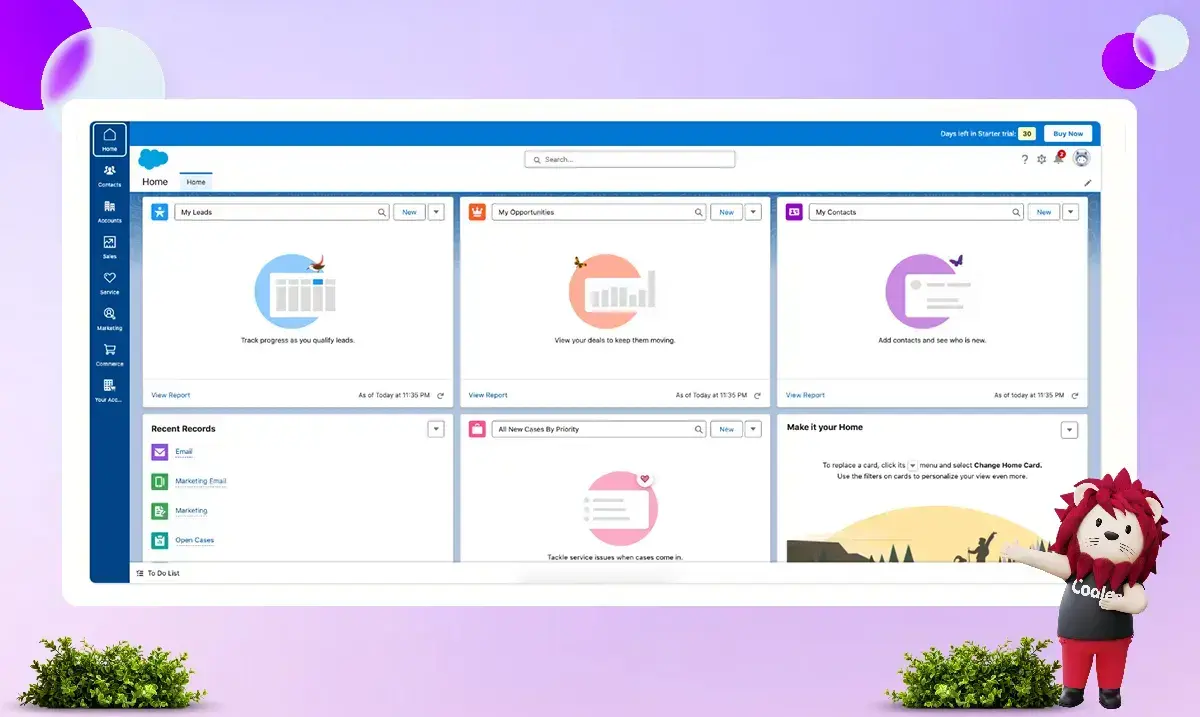
When set up correctly, Salesforce provides a clear, professional user interface. Its Sales Cloud features useful dashboards, reporting tools, and visibility into the sales pipeline.
The user experience can be inconsistent at times. Some features use the modern Lightning interface, while others depend on older design elements. It can lead to minor usability issues for users.
When fully optimized, Salesforce delivers a powerful, high-quality CRM experience for businesses.
Customer Support Structure
Salesforce’s support model is primarily designed for enterprise customers.
-
Phone support is not available with lower-tier plans. It may cost extra for mid-tier plans.
-
Email and chat support may take up to two working days, depending on your subscription tier.
-
You can find a lot of self-service training resources, documentation, and troubleshooting materials online.
Many businesses use certified Salesforce consultants and implementation partners to help them set up and improve the complex platform.
Overall Ease of Use Perspective
Salesforce is a powerful customer relationship management (CRM) platform that can grow with your organization and offers many customization options. However, its complexity may make it a poor fit for businesses looking for a simple, ready-to-use CRM solution.
It is best suited for businesses that:
-
Require advanced customization
-
Plan long-term scaling
-
Have access to technical expertise or implementation support
2. Product Capabilities
When comparing Zoho CRM vs Salesforce, product capabilities play a major role in deciding which platform is the right fit for your business. Both CRMs offer strong fundamentals, but they differ significantly in depth, scalability, and enterprise readiness.
Zoho CRM – Strong Fundamentals with Standout Features at Each Tier
Zoho CRM is built around simplicity, flexibility, and affordability. It covers all core sales management needs, including:
-
Contact and lead tracking
-
Deal and pipeline management
-
Activity and event tracking
-
KPI monitoring
-
Reporting and dashboards
Most small to mid-sized sales teams find that these basic features are enough to manage their daily operations effectively.
Tier-Based Feature Advantages
What makes Zoho CRM stand out is the value it offers at each pricing tier.
-
All paid plans include Canvas, the drag-and-drop graphical UI designer. It allows businesses to customize layouts and modules without technical complexity.
-
Professional plan users get SalesSignals, which sends real-time notifications when leads interact with your brand, including activity on third-party applications.
-
Enterprise and Ultimate plans include advanced capabilities, such as:
-
Social media data enrichment
-
Predictive AI insights for forecasting and lead assignment
-
AI-powered workflow recommendations
-
Advanced analytics and reporting tools
-
Given that many competing CRMs charge premium prices for AI and data enrichment features, Zoho CRM offers impressive value for its pricing.
Zoho CRM offers strong features at a competitive price, making it a great choice for growing businesses. It provides advanced tools without the high costs typical of larger enterprise solutions.
Salesforce – Comprehensive Capabilities for Enterprise-Scale Operations
Salesforce is widely regarded as one of the most comprehensive and customizable CRM platforms available today. Its massive ecosystem of integrations, add-ons, cloud products, and certified consultants means it can be tailored to nearly any business requirement.
Even without third-party extensions, Salesforce offers one of the most extensive out-of-the-box feature sets in the CRM industry.
Key Advanced Features
Beyond standard CRM basics, Salesforce provides:
-
Configure, Price, Quote (CPQ) functionality
-
AI-powered real-time sales insights and forecasting
-
Internal collaboration tool (Chatter)
-
Multiple developer sandboxes for testing and development
-
Lead registration and sharing tools
-
No-code app development with Lightning App Builder
-
Advanced forecasting and pipeline management
This depth of functionality makes Salesforce particularly well-suited for enterprise organizations with complex processes, multiple departments, and long-term scalability goals.
However, smaller businesses may find that they do not require the full range of capabilities Salesforce offers. Companies may prefer a simpler system with fewer features but easier management and lower overhead.
Product Capabilities: Which One Should You Choose?
-
Choose Zoho CRM if you want an affordable option that is easy to customize and has strong built-in AI features. It is less complex than enterprise-level solutions.
-
Choose Salesforce if you need to customize your system, use advanced tools for large businesses, and have a platform that can grow with your organization globally.
3. Pricing
Pricing is one of the most important factors when choosing between Zoho CRM and Salesforce. While both platforms offer tier-based pricing models, their cost structures and overall affordability differ significantly.
Zoho CRM – Affordable and Flexible Pricing Structure
Zoho CRM is widely regarded as a cost-effective CRM solution suitable for businesses of all sizes.
Free Plan
Zoho offers a basic free version that includes:
-
Contact, deal, task, and calendar management
-
Standard reports
-
Basic customization
-
Web forms
-
Basic email automation
-
API access
-
Team messaging
-
Document storage
This free plan allows up to three users per organization, which is great for startups or very small teams. If your business needs more than three users, you will need to upgrade to a paid plan.
Paid Plans & Scalability
Zoho CRM provides flexible billing options, including both annual and monthly payments (monthly plans include a small premium). Unlike many competitors, Zoho does not require a minimum number of users, and the cost per additional user remains consistent across tiers.
Another advantage is the relatively small pricing jump between tiers. The difference between the Standard and Ultimate plans is modest compared to many other CRM platforms.
Key Features Added at Each Tier
-
Standard – Canvas UI designer, social media integration (including data enrichment), custom dashboards, reports, and KPIs
-
Professional – SalesSignals, webhook access, validation rules, lead assignment rules, Google Ads integration, and inventory management tools
-
Enterprise – Zia AI helps with marketing by tracking customer sources, segmenting customers, and streamlining approval and review processes. It offers better customization and provides developers with tools, including access to a software development kit (SDK) and a testing environment.
-
Ultimate – Advanced business intelligence via Zoho Analytics and higher feature limits
This tier structure is designed intelligently. Each level introduces meaningful feature enhancements while keeping price increases manageable.
Overall, Zoho CRM remains highly competitive on pricing for small, mid-sized, and even larger organizations.
Salesforce – Premium Pricing with Enterprise Focus
Salesforce is positioned as a premium CRM platform, and its pricing reflects that.
Free Trial & Commitment
Salesforce offers a 30-day free trial with access to its full feature set. However:
-
There is no free-forever version.
-
After the trial, users must commit to an annual contract.
-
Monthly rolling contracts are not available.
For smaller businesses, this long-term commitment may be a barrier.
Tier Limitations & Cost Escalation
Salesforce’s entry-level plan is only available for businesses with up to 10 users. Once a business exceeds that limit, it must upgrade to a higher-tier plan, resulting in a significant increase in costs.
Additionally:
-
Professional, Enterprise, and Unlimited plans are considerably more expensive per user than most competing CRMs.
-
The Enterprise tier is significantly more expensive than similar-tier plans on platforms like Zoho CRM.
While higher tiers include advanced features such as workflow automation, Lightning Platform tools, advanced team management, and 24/7 support (at the highest level), the price increases are substantial.
Hidden & Additional Costs
The subscription fee is often not the total cost of ownership for Salesforce. Businesses should also consider:
-
Paid third-party apps from the AppExchange marketplace
-
Implementation and customization expenses
-
Ongoing administrator or consultant support
Salesforce is very customizable and complex. Because of this, many organizations need professional help for implementation, which increases the overall investment.
Pricing Comparison: Final Perspective
-
Zoho CRM is a great choice for businesses that want an affordable, flexible solution with clear costs as they grow.
-
Salesforce works best for large companies that need extensive customization and are ready to invest more over the long term.
In short, Zoho offers strong value for money, while Salesforce delivers enterprise-grade capability at a premium price.
4. Scalability
Scalability is a critical factor when choosing a CRM, especially for businesses planning long-term growth. While both Zoho CRM and Salesforce offer scalable solutions, they approach growth and expansion very differently.
Zoho CRM – Smooth Scaling for Growing Businesses
Zoho CRM helps small and mid-sized businesses grow. It has flexible pricing, making it easier to expand without breaking the budget. The small cost differences between pricing tiers make planning for growth more straightforward.
Zoho's pricing increases gradually across plans, helping businesses upgrade features without sudden cost jumps. It makes Zoho appealing to startups and growing companies looking to manage expenses as they expand.
Ecosystem Advantage
Another major strength is the broader Zoho ecosystem. Zoho offers a wide range of complementary business applications, including tools for:
-
Marketing automation
-
Accounting and finance
-
HR management
-
Project management
-
Customer support
These products share a consistent user experience and integrate smoothly with Zoho CRM. When used together, they create a unified business operating system that simplifies workflows and reduces integration challenges.
Is Zoho Suitable for Enterprises?
Zoho CRM works well for many mid-sized and even large businesses. However, for highly complex enterprises with advanced customization needs, there may be limitations.
Even at the Ultimate tier, certain elements—such as the number of custom fields, scoring rules, and validation rules—are capped. Organizations requiring unlimited flexibility and deeply customized workflows may find these restrictions limiting.
In summary:
-
Zoho is excellent for scaling from small to mid-sized operations.
-
It offers strong value for money.
-
It may not provide the limitless customization that very large enterprises require.
Salesforce – Built for Enterprise-Scale Operations
Salesforce was designed primarily for enterprise users. Its scalability is virtually unmatched in the CRM industry due to its:
-
Deep customization capabilities
-
Extensive integration ecosystem
-
Advanced cloud-based architecture
-
Global partner and consultant network
Large organizations benefit significantly from Salesforce’s ability to customize workflows, data models, automation processes, and reporting structures far beyond standard CRM capabilities.
Multi-Cloud Ecosystem
Salesforce Sales Cloud is part of a larger set of business platforms.
Each of these clouds is built around CRM data but optimized for different business functions. When deployed together, they create a highly integrated system that minimizes data silos and improves cross-department collaboration.
Scalability vs Cost Consideration
While Salesforce offers exceptional scalability, it comes with:
-
Higher subscription costs
-
Steeper learning curves
-
Greater implementation complexity
For small and mid-sized businesses, using Salesforce can be harder during the early stages of growth due to certain challenges.
Scalability Comparison: Which CRM Grows with You?
-
Zoho CRM is ideal for businesses scaling steadily and seeking affordable, structured growth.
-
Salesforce is ideal for organizations that operate at scale or require significant customization and integration across multiple clouds.
Zoho is good for gradually growing a business with lower costs, while Salesforce is better for handling large, complex business needs.
5. Integrations and App Ecosystems
Integrations are important when choosing a CRM platform. Connecting your CRM to marketing tools, finance software, phone systems, and productivity apps affects how smoothly your entire tech setup runs.
Zoho CRM and Salesforce both have large systems, but they differ in how they work and their costs.
Zoho CRM – A Broad Ecosystem of Lightweight Business Tools
Zoho CRM is part of a large suite of business SaaS applications developed within the Zoho ecosystem. These include tools for:
-
Customer support (Zoho Desk)
-
Password management (Zoho Vault)
-
Email hosting (Zoho Mail)
-
Accounting (Zoho Books)
-
Payment processing (Zoho Checkout)
-
And many more
Most Zoho products are:
-
Fully standalone applications
-
Easy to integrate into existing workflows
-
Cost-effective compared to many competitors
It makes Zoho particularly attractive to small and growing businesses looking for affordable, connected tools within a single ecosystem.
Native Integrations
Zoho CRM offers a variety of native integrations to enhance its functionality, including:
-
Productivity tools such as Zapier, Trello, and many others
-
Telephony solutions like Ring.io, Amazon Connect, and over 100 additional providers
-
Finance tools such as QuickBooks, PayPal, and other accounting applications
Zoho also offers an extensive marketplace of add-ons that allow businesses to:
-
Customize CRM for specific industries
-
Extend functionality
-
Integrate third-party tools
API & Webhook Access
All Zoho CRM users have access to its API, though the number of API calls increases with higher-tier plans.
One limitation is that webhooks are only available from the Professional tier onward, and even then, with usage limits. In some scenarios, relying primarily on APIs rather than webhooks can affect operational speed.
Despite this minor limitation, Zoho CRM offers a strong, lightweight, and affordable integration ecosystem that works especially well for small and mid-sized businesses.
Salesforce – Enterprise-Grade Integrations at Scale
Salesforce is widely known for having one of the most comprehensive app ecosystems in the CRM industry.
It is largely due to:
-
Its long-standing presence in the SaaS market
-
A strong focus on deep customization
-
An ambition to serve as a central hub for all business operations
Salesforce AppExchange
The Salesforce AppExchange is one of the most mature and extensive SaaS marketplaces available. It includes:
-
Thousands of pre-built applications and integrations
-
Lightning-ready components
-
Industry-specific CRM configurations
-
Access to certified consultants and implementation partners
Many businesses can configure Salesforce to manage nearly every business function, from sales and marketing to customer service and commerce.
Customization & Development Flexibility
Salesforce provides:
-
Lightning App Builder for no-code app development
-
Multiple APIs for deep system integrations
-
Enterprise-level customization tools
-
You can connect with many certified consultants.
However, many advanced integrations and add-ons are paid solutions. In some cases, certain APIs and web services require higher-tier plans or additional licensing.
As a result, while Salesforce offers unmatched flexibility and scalability, the total cost of integrations can increase significantly depending on business needs.
Integration Comparison: Which Ecosystem Is Better?
-
Zoho CRM offers an affordable, streamlined ecosystem that works extremely well for small to mid-sized businesses seeking simplicity and cost efficiency.
-
Salesforce provides unmatched enterprise-level flexibility and a massive marketplace, but often at a higher financial investment.
In summary, Zoho delivers lightweight, cost-effective integrations, while Salesforce excels in large-scale, deeply customized enterprise environments.
Zoho Corporation vs Salesforce: Complete CRM Comparison (2026)
Choosing the right CRM can boost your sales, improve marketing efficiency, and enhance customer experience. This comparison compares Zoho and Salesforce across sales, marketing, customer support, analytics, automation, and integrations. This way, you can decide which CRM is best for your business.
Zoho vs Salesforce: Sales Features
Both CRMs are powerful, but they serve different levels of business complexity.
Lead & Opportunity Management
-
Zoho CRM: Manages the full sales cycle — lead capture, nurturing, and deal closure.
-
Salesforce CRM: Offers a centralized system with deep visibility into leads, accounts, opportunities, and activities.
Verdict: Zoho keeps things simple. Salesforce provides deeper visibility and smarter recommendations.
Sales Forecasting
-
Zoho: Forecasting based on roles and territories. Includes pipeline and rep performance tracking.
-
Salesforce: Highly customizable forecasting with real-time KPI tracking.
Verdict: Salesforce offers more advanced and customizable forecasting tools.
Sales Activities
-
Zoho: Detailed tracking of tasks, calls, events, and notes.
-
Salesforce: Centralized view of all engagement activities in one dashboard.
Multi-Currency Management
-
Zoho: Supports currency conversion and report exports in multiple currencies.
-
Salesforce: Also supports multi-currency transactions.
Products & Price Books
-
Zoho: Requires Professional plan ($35/user/month) for product configuration (limited to 10 products).
-
Salesforce: Flexible product catalog and pricing structures.
Sales Features – Final Verdict
-
Choose Zoho for a simple and affordable sales CRM.
-
Choose Salesforce if you need strong sales tools and the ability to grow your business.
Zoho vs Salesforce: Marketing Features
Marketing capabilities show a bigger gap between the two platforms.
Campaign Management
-
Zoho: Create and track campaigns directly within CRM.
-
Salesforce: Pre-built templates and advanced campaign optimization tools.
Mass Email Limits
-
Zoho: 250 emails/day per organization (sales-focused).
-
Salesforce: 5,000 emails/day per organization.
Email Templates
-
Zoho: Up to 100 templates.
-
Salesforce: Advanced email builder + customizable templates.
Advanced Marketing Tools in Salesforce
Salesforce offers:
-
Drag-and-drop email builder
-
Advanced customer segmentation
-
Einstein Send Time Optimization (STO)
-
Campaign Analytics
Marketing Features – Final Verdict
-
Choose Zoho for basic email campaigns.
-
Choose Salesforce if marketing is a major growth channel for your business.
Zoho vs Salesforce: Customer Support
Zoho CRM
-
The standard edition only provides email notifications when a case is created.
-
To use advanced support features, you need to upgrade to the Professional plan.
Salesforce Starter Suite
Includes:
-
Case management
-
Email support
-
Knowledge base
-
Custom email templates
Customer Support – Final Verdict
-
Choose Zoho if you don't need strong support.
-
Choose Salesforce if you need built-in customer service tools immediately.
Zoho vs Salesforce: Analytics Capabilities
Standard Reports
-
Zoho: Pre-built reports across CRM modules.
-
Salesforce: Real-time visual dashboards across sales, service, and marketing.
Custom Reports
-
Zoho: Up to 100 custom reports.
-
Salesforce: Advanced custom report builder + editable standard reports.
Dashboards
-
Zoho: Standard and custom dashboards.
-
Salesforce: Pre-built dashboards + advanced customization.
AI & Advanced Analytics
-
Zoho: Built-in cohort analysis.
-
Salesforce: AI-powered insights via Einstein and Generative Canvas.
Analytics – Final Verdict
-
Choose Zoho for tracking performance easily.
-
Choose Salesforce for decisions powered by AI and grounded in data.
Zoho vs Salesforce: Automation
Automation is where Salesforce becomes significantly stronger.
Macros
-
Zoho: Automates repetitive sales tasks (emails, follow-ups, lead updates).
-
Salesforce: AI-powered macros with natural language support.
Workflow Automation
-
Zoho: 30 regole per modulo (15 attive).
-
Salesforce: Salesforce Flow (up to 2000 flows per type).
Assignment Rules
-
Zoho: 10 rules/module.
-
Salesforce: 2,000 platform-level rules.
Automation – Final Verdict
-
Choose Zoho for simple sales automation.
-
Choose Salesforce for complex multi-department automation.
Zoho vs Salesforce: Integration Options
Zoho CRM
-
Up to 5 marketplace extensions (Standard plan).
-
Integrates with:
-
LinkedIn Sales Navigator
-
WhatsApp Business
-
Slack
-
Google Workspace
-
Other Zoho apps
-
Zoho is flexible and strong in third-party integrations.
Salesforce Starter Suite
-
Built-in ecosystem for sales, service, marketing, and commerce.
-
Integrates with Gmail and Outlook natively.
Integration – Final Verdict
-
Choose Zoho if you rely on many third-party tools.
-
Choose Salesforce if you prefer a unified ecosystem.
Zoho vs Salesforce: Implementation Cost (Real Breakdown)
When comparing CRM platforms, most businesses focus only on subscription pricing. But the real investment includes setup, training, customization, and onboarding.
Let’s break down the implementation costs of Zoho Corporation's CRM vs. Salesforce for a 10-user setup.
Zoho CRM Implementation Cost
One of Zoho CRM’s biggest advantages is that it can be self-implemented — especially if your business processes are simple.
If you already have:
-
Structured and clean data
-
Clearly defined sales processes
-
Basic understanding of CRM configuration
You can set it up internally using Zoho’s implementation guides and getting-started resources.
For a team of 10 users on the Zoho Standard plan:
-
The subscription cost would be $20 per user per month, totaling $200.
-
If you add online training for 2 users to help your team understand CRM usage and benefits, that would cost around $1,998.
-
Your total first-time cost would be approximately $2,198.
It makes Zoho one of the most affordable CRM platforms to implement — especially for startups and small businesses.
When Self-Implementation May Not Be Enough
Self-implementation works best when your processes are straightforward.
However, if:
-
Your workflows are complex
-
You need an automation setup
-
Data migration is messy
-
You require customization
You may need help from an implementation partner.
Zoho implementation partners typically charge between $500 and $2,000, depending on project complexity.
That brings your estimated total first-time investment to somewhere between $2,198 and $4,198.
In short, Zoho keeps implementation flexible and budget-friendly.
Salesforce Implementation Cost
Salesforce is more powerful — and with that power comes more complexity.
While Salesforce does offer guided onboarding for its Starter and Pro suites, many businesses prefer working with certified implementation partners to configure the system properly.
For example, companies often work with partners like Codleo, which specialize in customizing Salesforce according to specific business needs.
Codleo’s fixed-price Salesforce Quickstart packages start at $3,500 as a one-time implementation fee. It typically includes:
-
Requirement discovery sessions
-
CRM configuration
-
Custom setup
-
End-user training
For a 10-user setup on Salesforce Starter Suite ($25 per user per month), the subscription cost would be $250 per month.
When you add the $3,500 implementation package, your total first-time cost comes to approximately $3,750.
Salesforce implementation is generally more structured and partner-driven than Zoho's.
Which One Should You Choose?
Choose Zoho CRM if:
-
Your budget is limited
-
Your sales processes are simple
-
You can manage the setup internally
-
You want lower upfront costs
Choose Salesforce if:
-
You need professional implementation support
-
Your processes are complex
-
Multiple departments will use the CRM
-
You’re planning long-term scalability
Final Thoughts
If affordability and ease of setup are your main concerns, Zoho CRM clearly has the lower barrier to entry.
But if you’re building a system meant to scale across sales, service, and marketing — and you want expert-led configuration from day one — Salesforce justifies its higher implementation cost.
Final Verdict: Zoho CRM vs Salesforce
Both Zoho CRM and Salesforce place CRM at the center of a broader ecosystem of business SaaS tools. However, the philosophy behind each platform is fundamentally different.
Zoho built its CRM around the needs of small and growing businesses. Its focus has consistently been on simplicity, affordability, and quick implementation. Salesforce, on the other hand, was designed for enterprise organizations—prioritizing deep customization, scalability, and comprehensive functionality.
Although both platforms now serve businesses of all sizes, their origins are clearly reflected in what they emphasize and how their products are structured.
What Zoho CRM Prioritizes
Zoho CRM is centered around:
-
Ease of use
-
Fast onboarding
-
Affordable pricing
-
Simple customization
-
Seamless integration within the Zoho ecosystem
It delivers a high-quality CRM solution with standout features, including Canvas customization, built-in AI capabilities, and strong value at each pricing tier.
For small and mid-sized businesses (SMEs), Zoho offers an attractive balance between functionality and cost. Its easy-to-use tools make it especially attractive to companies looking to simplify their technology setup without incurring high implementation costs.
What Salesforce Prioritizes
Salesforce focuses on:
-
Advanced customization
-
Enterprise-grade scalability
-
Comprehensive feature depth
-
Multi-cloud integration
-
Extensive third-party ecosystem
Salesforce Sales Cloud sits at the core of one of the most powerful SaaS ecosystems available today. It is exceptionally capable and can be configured to handle highly complex business requirements.
However, this power comes with:
-
Higher subscription costs
-
Additional implementation expenses
-
A steeper learning curve
For large enterprises that require unlimited flexibility and global scalability, Salesforce is often the stronger long-term investment.
Which CRM Should You Choose?
-
Choose Zoho CRM if you are a startup, small business, or mid-sized company seeking affordability, ease of use, and quick deployment.
-
Choose Salesforce if your organization is large and requires extensive customization, advanced integrations, and sustainable growth across various business areas.
In shorts
-
Zoho is simple to use and offers great value for money.
-
Salesforce has greater power and is better suited to larger organizations.